Graph construction
Introduction
The first step to constructing the graph theory model is constructing a pairwise distance matrix for the selected amino acid residues. The distance is calculated either between centers of mass of the side chains, or between their closest atoms. For standard protein residues, only side chain atoms are considered in the calculation. All atoms of automatically identified non-protein ET active moieties and user-specified custom fragments are considered in the distance calculations. From the distance matrix, an undirected weighted graph is constructed using NetworkX, initially with the calculated distances as weights.
Penalty Functions
The next step is to recast the weights as modified distance dependent penalty functions:
where:
α, β, and \(R_{offset}\) are hopping parameters, similar to the through-space tunneling penalty function in the Pathways model [Beratan1992]. All subsequent calculations are performed using the modified penalty functions as edge weights. When using default hopping parameters (α = 1.0, β = 2.3, Roffset = 0.0), the edge weights will be equal to the distances (multiplied by a prefactor of \(2.3*log_{10}(e)\) ≈ 1).
Edge Pruning
One of two algorithms is used to prune the edges of the graph, which is specified by the edge_prune keyword argument
to process().
Percent-based algorithm (default)
This algorithm considers only the smallest percent_edges % of edges by weight per node, and then prunes based on the mean and standard deviation
of the weights of the remaining edges.
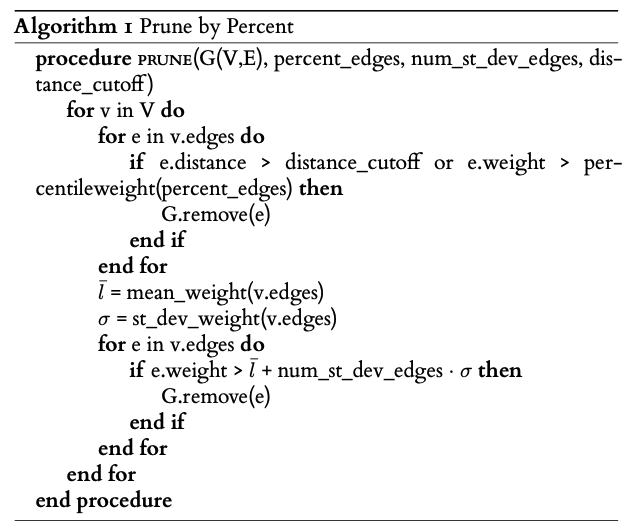
percent_edges, num_st_dev_edges, and distance_cutoff are specified as keyword arguments to
process().
Specify edge_prune='PERCENT' to use this algorithm.
Degree-based algorithm
This algorithm greedily prunes the largest edges by weight of the graph until each node has at most max_degree neighbors.
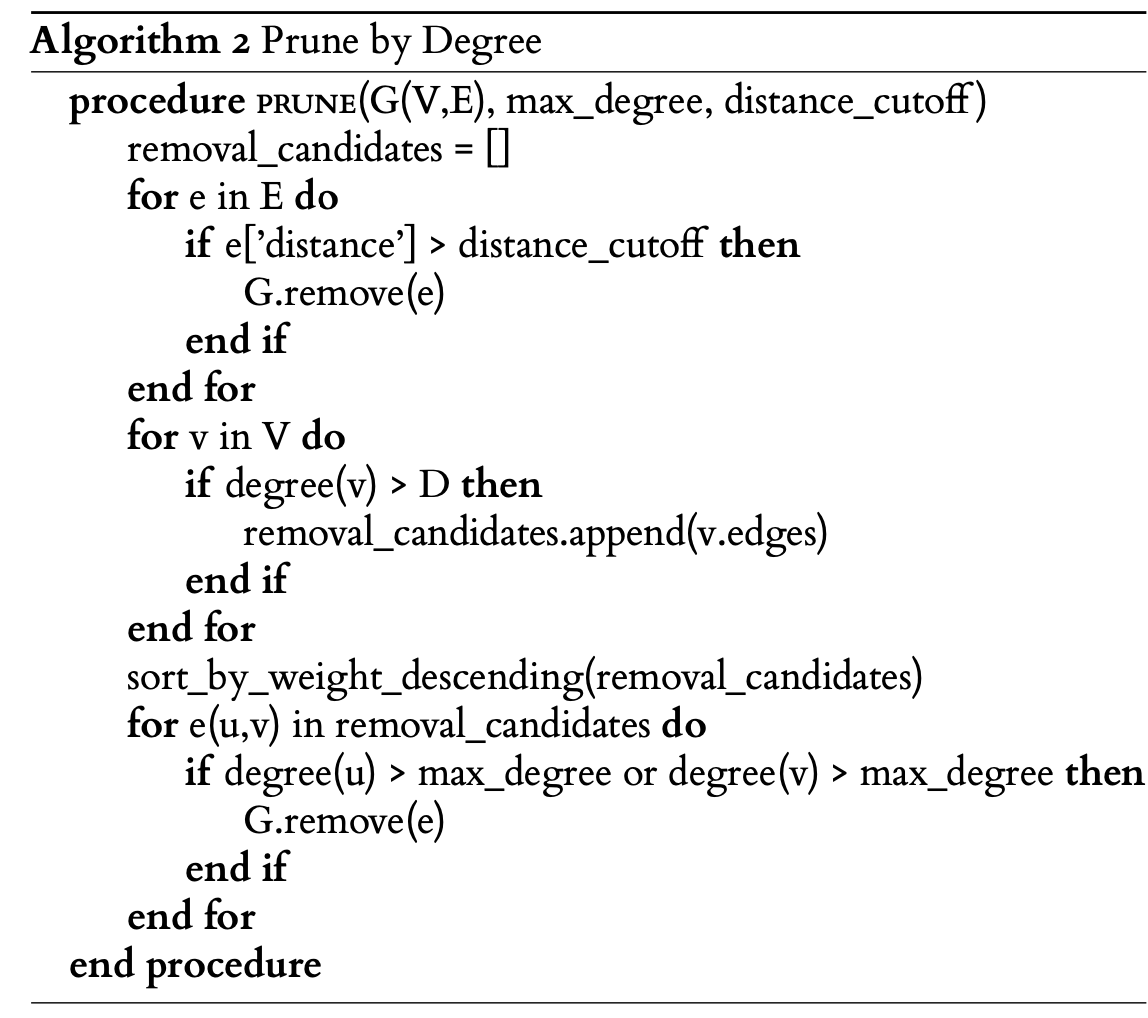
max_degree and attr:distance_cutoff: are specified as keywords arguments to process().
Specify edge_prune='DEGREE' to use this algorithm. This algorithm is recommended when doing Protein Graph Mining.
Visualization and further analysis
The graph can be interacted with and written to file using the emap object. The graph is visualized using PyGraphviz and
Graphviz. The graph is stored as a networkx.Graph object in the init_graph and paths_graph attributes of the emap object.
>>> G = my_emap.init_graph
>>> print(G.edges[('W17(A)', 'W45(A)')]['distance'])
>>> 12.783579099370808
Source
|
Constructs the graph from the distance matrix and node labels. |
|
Applies penalty function parameters and returns score. |